Settings and account data
Open Settings to control the app for your account. Some switches depend on server configuration owned by the deployment operator; others depend on permissions and support in your browser or device. An app administrator does not necessarily control either layer.
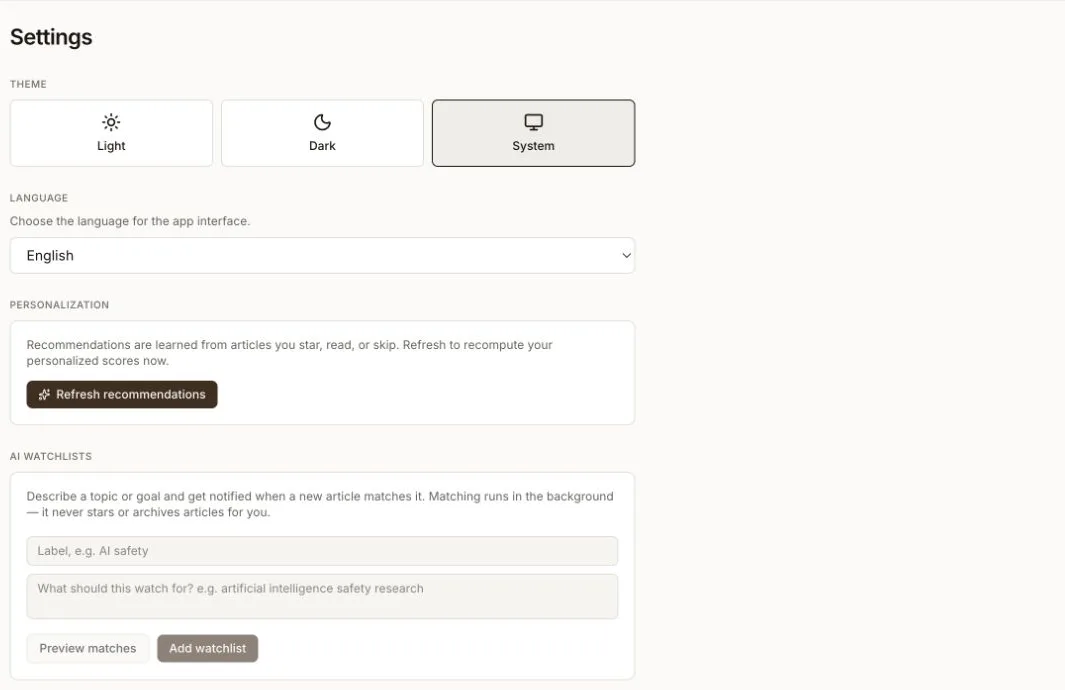
Interface and personalization
- Theme selects Light, Dark, or System.
- Language changes the app interface language.
- Refresh recommendations recomputes personalized scores from the articles you star, read, or skip.
- AI Watchlists and AI Memory manage the personal AI context described in Personalization and AI.
Daily Brief schedule and delivery
Under Daily Brief, choose a generation time and an IANA timezone. Daylight saving changes are applied from the timezone, so use the region-based timezone that represents your schedule rather than manually adjusting a fixed offset.
Delivery controls have additional requirements:
- Email briefing needs an email address on your account and email delivery configured by the deployment operator. When both are available, you can enable or disable delivery and send a preview.
- Push notifications need notification permission and a supported browser service worker, or the desktop app. Browser push also needs VAPID keys on the server.
Changing a reader preference cannot make an unconfigured delivery channel available. Contact the deployment operator if Settings reports that the server does not support the channel.
Weekly Recap delivery
Enable Send weekly recap and choose a delivery day to receive the reading recap by push. It is delivered at your Daily Brief time in your briefing timezone. This switch controls delivery; the Weekly Recap page remains the place to read available recaps.
Privacy analytics
Usage analytics records route views, time in the app, and article dwell time for recommendations and reading insights. Turn it off to opt your account out. A deployment operator can disable analytics for the entire instance; when that global control is off, the personal switch is disabled and no personal setting can override it.
Export and restore
Select Download archive before a migration, account cleanup, or other significant change. The JSON archive includes reading history, starred articles, workflow state, daily briefings, source subscriptions, AI memories, recommendation and onboarding preferences, and notification settings. Cached article body text and secrets are excluded.
Restore archive imports a previously downloaded archive into the current account. Matching articles, briefings, AI memories, source subscriptions, and preferences are updated instead of blindly duplicated, and Settings reports added, updated, and skipped counts. Keep the original file until you have checked the result.
Check the installed version
The Updates section changes with the app platform:
- the web app reports its deployed version and links to release history; the live web app updates with the server release;
- the Android wrapper can check releases and offer an APK download; and
- the desktop app checks for an update, downloads it, and offers to restart when it is ready.
The deployment operator still controls when a self-hosted web server is upgraded.
Delete the account
Delete my account permanently removes the account and its associated reading history, starred articles, highlights, shares, and preferences. The app requires the current username as confirmation and signs you out after deletion.
This action cannot be undone. If you may need the data supported by export, download and verify an archive first, then confirm that you are signed into the intended account before deleting it.
The archive is a partial backup, not an undo for deletion. Restore covers articles and workflow state, briefings, AI memories, source subscriptions, and preferences; it does not restore highlights, shares, or every other account-associated record.